posts/2026-01-25 — less +F
KSizer: A Sizer-Inspired KWin Script for KDE Plasma
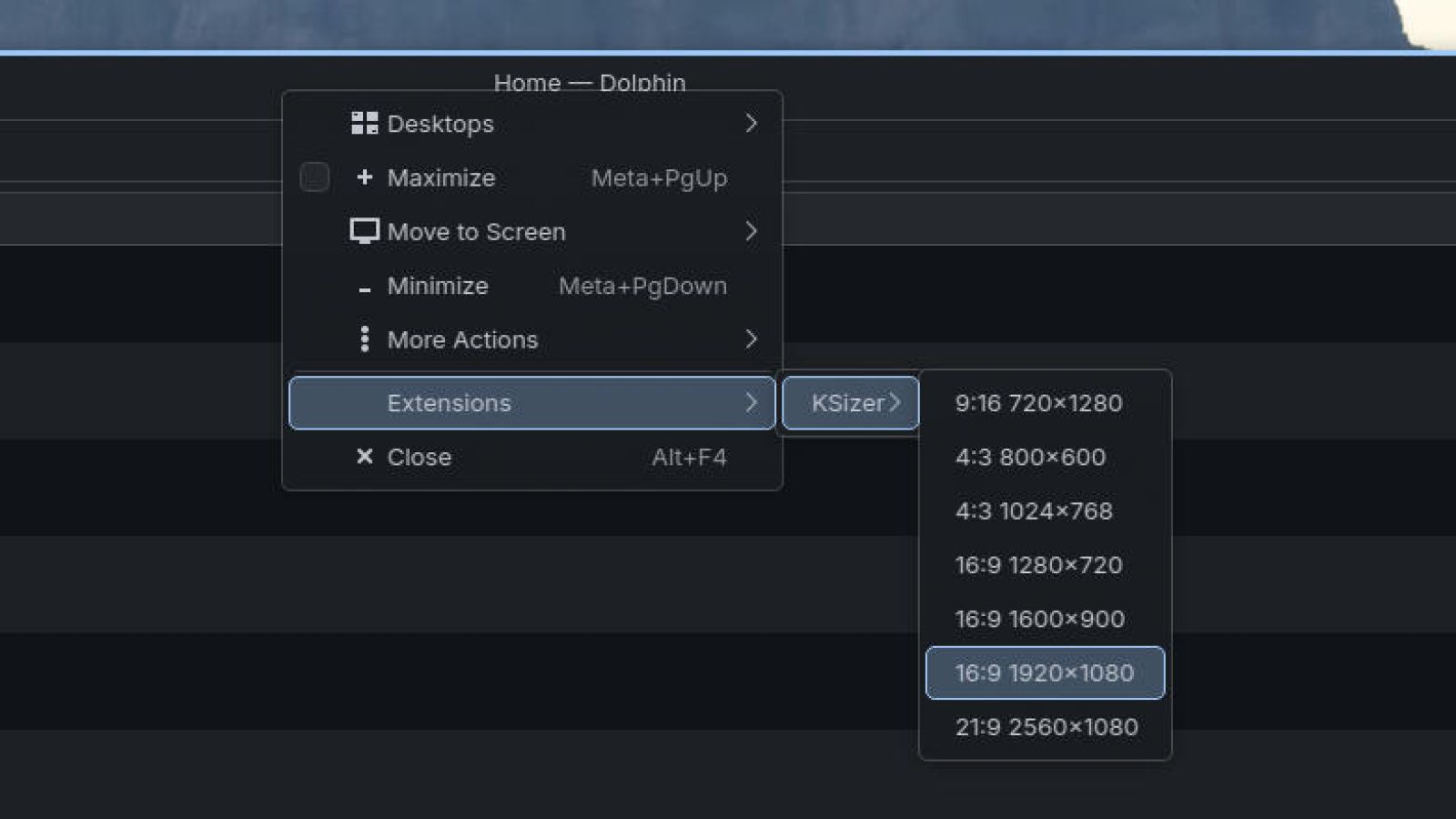
I've always been a little picky about window management.
On Windows, one of my favorite tiny-but-mighty utilities was Sizer by Brian Apps: https://www.brianapps.net/sizer4/. It's the kind of tool that disappears into your muscle memory—right-click a window, pick an exact size (or a preset), and you're done. No dragging. No "close enough." Just precise, repeatable window sizes. I really loved the idea of having an exact 1080p window at the center of my screen.
When I moved to CachyOS and made KDE Plasma my daily driver, I loved the desktop… but I immediately missed that Sizer workflow.
How about tiling managers then? I tried and came to the conclusion that it was just too much for me. There were just too many keyboard shortcuts to memorize! I didn't want the simple act of using my desktop to be something I even had to spend time learning.
So I wrote KSizer: a KWin Script that brings that "pick an exact size now" experience to Plasma.
Project Links
The problem: resizing is easy, resizing consistently is not
KDE Plasma (and KWin) already give you a lot:
- Tiling and quick tiling
- Keyboard shortcuts for moving windows around
- Scripts and rules if you want to go deep
But there's a specific gap that Sizer filled for me:
- "Make this window exactly 1280×720"
- "Resize this window to my 'blog editor' preset"
- "Snap this to a known size so screenshots and recordings look consistent"
Dragging borders works… until it doesn't. It's slower, it's imprecise, and it's surprisingly disruptive when you're doing it dozens of times in a day.
The idea: bring Sizer's menu-driven sizing to KWin
Sizer's UX is basically perfect for what it does:
- Trigger a context menu on the active window
- Pick a preset size
- Window resizes immediately
That's what I wanted on Plasma, but native to the window manager.
KWin scripts are a great fit here because they sit right where they need to:
- They can access the active window
- They can read and set window geometry
- They can be triggered via shortcuts or actions
So KSizer is intentionally simple: a lightweight KWin script that resizes the focused window to predefined dimensions.
Why I built it as a KWin Script (instead of a separate app)
There are a few reasons I didn't want this to be "yet another always-running tray utility":
- Lower friction: if it's part of KWin, it feels like part of the desktop
- Focus awareness: KWin already knows what your active window is
- Integration: shortcuts, scripting, and window geometry are first-class concepts
- Portability: I can bring the workflow with me across Plasma installs
In other words: KWin is already the layer that controls the behavior I care about—so it made sense to extend it there.
Where KSizer shines
I built KSizer because I constantly run into workflows where exact window sizes matter:
- Recording demos / screen capture (consistent aspect ratios)
- Taking clean screenshots for docs or README files
- Coding + docs side-by-side where a "known good" width improves readability
- Testing responsive layouts (quickly jumping between sizes)
Even if you're not pixel-peeping, there's a productivity benefit to removing "window fiddling" from the day.
How to try it
If you're on KDE Plasma and you want Sizer-style resizing, KSizer is here:
https://github.com/allenguarnes/KSizer
The README in the repo is the source of truth for installation and configuration, but the general flow is:
- Install the KWin script
- Configure your presets
- Trigger it (shortcut/menu) on the active window
What I want to improve next
This project scratches my personal itch, but I also want it to feel polished for anyone else who tries it. Some ideas I'm thinking about:
- Easier preset editing (less manual config)
- Better multi-monitor awareness
- Preset specific optional "resize + move to center"
- More presets tuned for common workflows (16:9, 21:9, social content, etc.)
If you try KSizer and have suggestions (or if you were a Sizer user too), feel free to open an issue on GitHub.
Closing thoughts
I didn't move to Linux because I wanted to lose the little tools that made me fast on Windows.
KSizer is my way of keeping one of those workflows—fast, repeatable, exact window sizing—while leaning into what KDE Plasma does best: letting you customize your desktop until it fits you perfectly.
If you've ever missed Sizer on Linux, I hope KSizer feels instantly familiar.